> ## Documentation Index
> Fetch the complete documentation index at: https://docs.x-mart.io/llms.txt
> Use this file to discover all available pages before exploring further.
# Introduction
The X-Mart APIs enable customers to programmatically manage **stores**, **lists**, **and** **orders** on the X-Mart platform, providing a seamless and efficient way to integrate your ERP or POS with our headless commerce solution.

 # Integration Process Overview
X-Mart is a **headless commerce platform** with a robust integrations API that simplifies the synchronization and management process from an external ERP or POS system. By leveraging our APIs, you can automate and centralize your operations, ensuring an **updated and continuous flow of information** across your systems.
# Integration Process Overview
X-Mart is a **headless commerce platform** with a robust integrations API that simplifies the synchronization and management process from an external ERP or POS system. By leveraging our APIs, you can automate and centralize your operations, ensuring an **updated and continuous flow of information** across your systems.
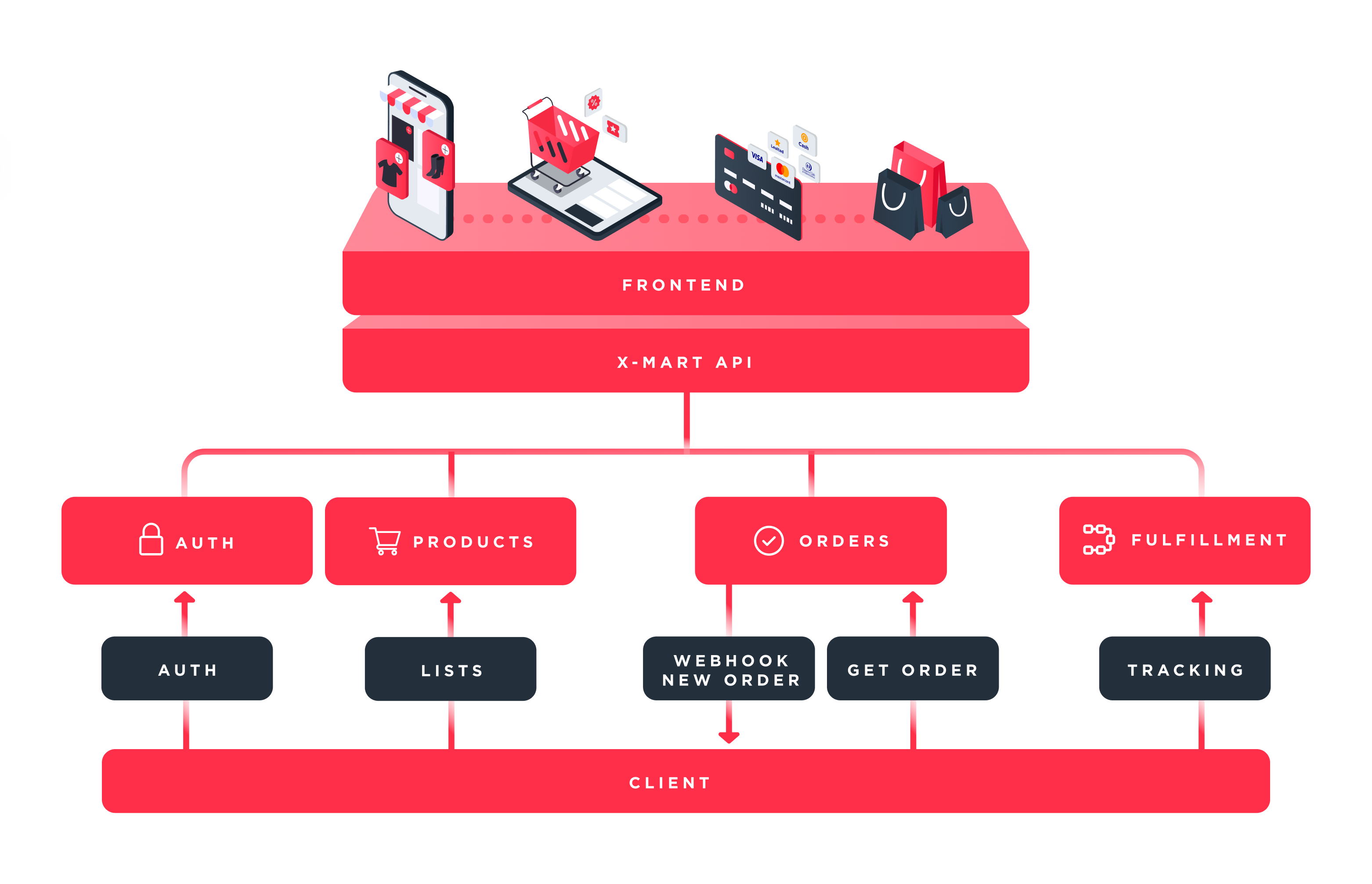
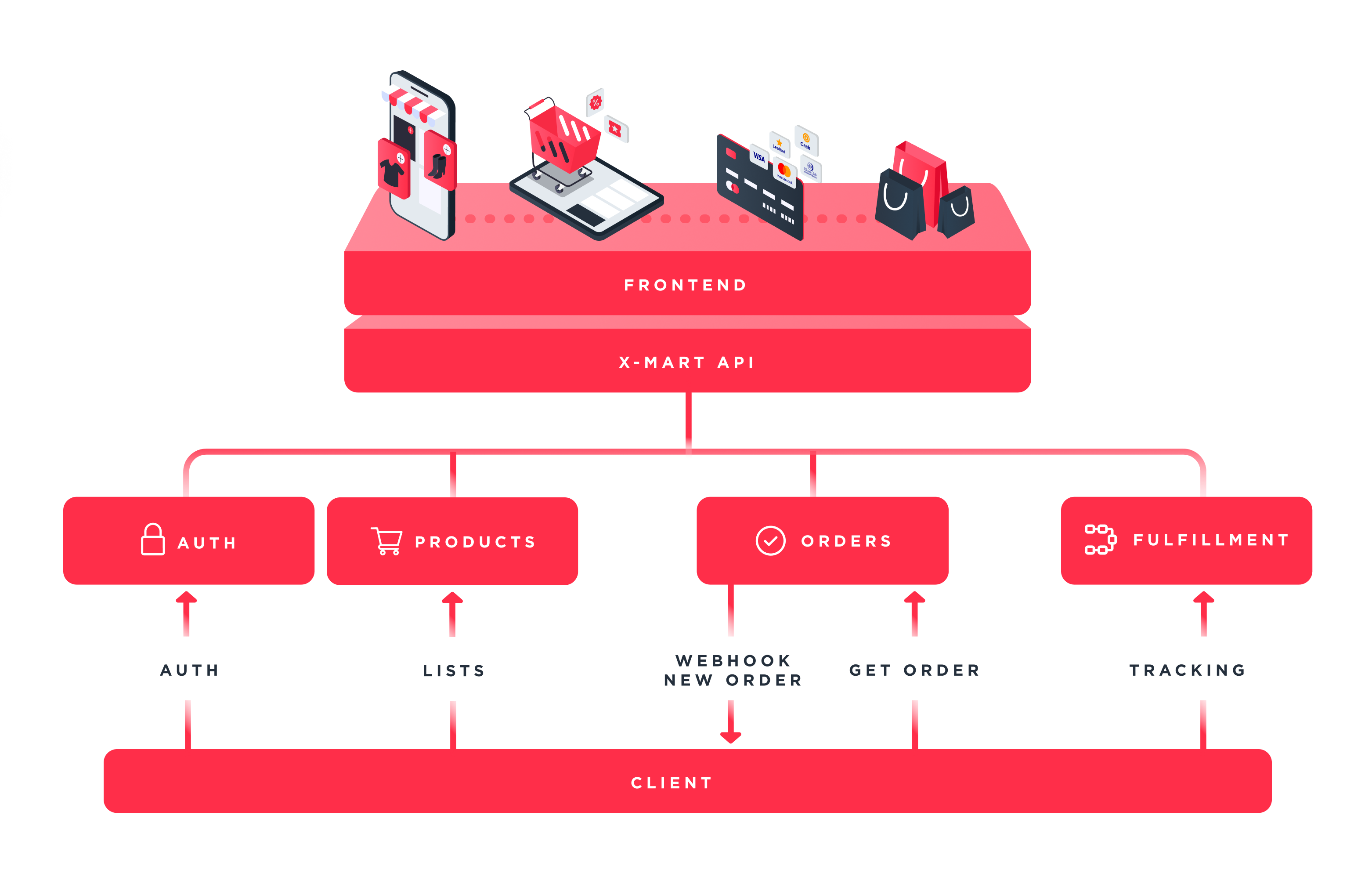 **Note:** This integration workflow facilitates centralized and efficient process management, ensuring a seamless exchange of information.
Are you ready? Let's create your account at X-Mart 🚀
# Key Integration Steps
Here’s a brief overview of the APIs involved in the integration process:
### 1. Auth API
* Manage authentication and secure access to the X-Mart APIs.
* Generate and refresh tokens for authorized API requests.
### 2. Stores API
* Create, update, and manage stores and sales channels in the X-Mart platform.
* Retrieve detailed information about stores and modify their status programmatically.
### 3. Lists API
* Synchronize and manage product lists, including categories, products, modifiers, and options.
* Access detailed reports on synchronization status, errors, and warnings to ensure data accuracy.
### 4. Orders API
* Ingest and manage incoming orders with real-time webhook notifications.
* Update order statuses to reflect operational progress.
# Next Steps
To get started with the X-Mart APIs:
1. Familiarize yourself with the authentication process in the **Auth API** section.
2. Begin configuring your stores using the **Stores API**.
3. Synchronize your product data using the **Lists API**.
4. Set up and test your order integration with the **Orders API**.
Explore the rest of the documentation for detailed guides, examples, and best practices for each API.
Find a guide to integrate X-Mart with your e-commerce platforms
**Note:** This integration workflow facilitates centralized and efficient process management, ensuring a seamless exchange of information.
Are you ready? Let's create your account at X-Mart 🚀
# Key Integration Steps
Here’s a brief overview of the APIs involved in the integration process:
### 1. Auth API
* Manage authentication and secure access to the X-Mart APIs.
* Generate and refresh tokens for authorized API requests.
### 2. Stores API
* Create, update, and manage stores and sales channels in the X-Mart platform.
* Retrieve detailed information about stores and modify their status programmatically.
### 3. Lists API
* Synchronize and manage product lists, including categories, products, modifiers, and options.
* Access detailed reports on synchronization status, errors, and warnings to ensure data accuracy.
### 4. Orders API
* Ingest and manage incoming orders with real-time webhook notifications.
* Update order statuses to reflect operational progress.
# Next Steps
To get started with the X-Mart APIs:
1. Familiarize yourself with the authentication process in the **Auth API** section.
2. Begin configuring your stores using the **Stores API**.
3. Synchronize your product data using the **Lists API**.
4. Set up and test your order integration with the **Orders API**.
Explore the rest of the documentation for detailed guides, examples, and best practices for each API.
Find a guide to integrate X-Mart with your e-commerce platforms