> ## Documentation Index
> Fetch the complete documentation index at: https://docs.x-mart.io/llms.txt
> Use this file to discover all available pages before exploring further.
# Menu integration Guide
# Overview
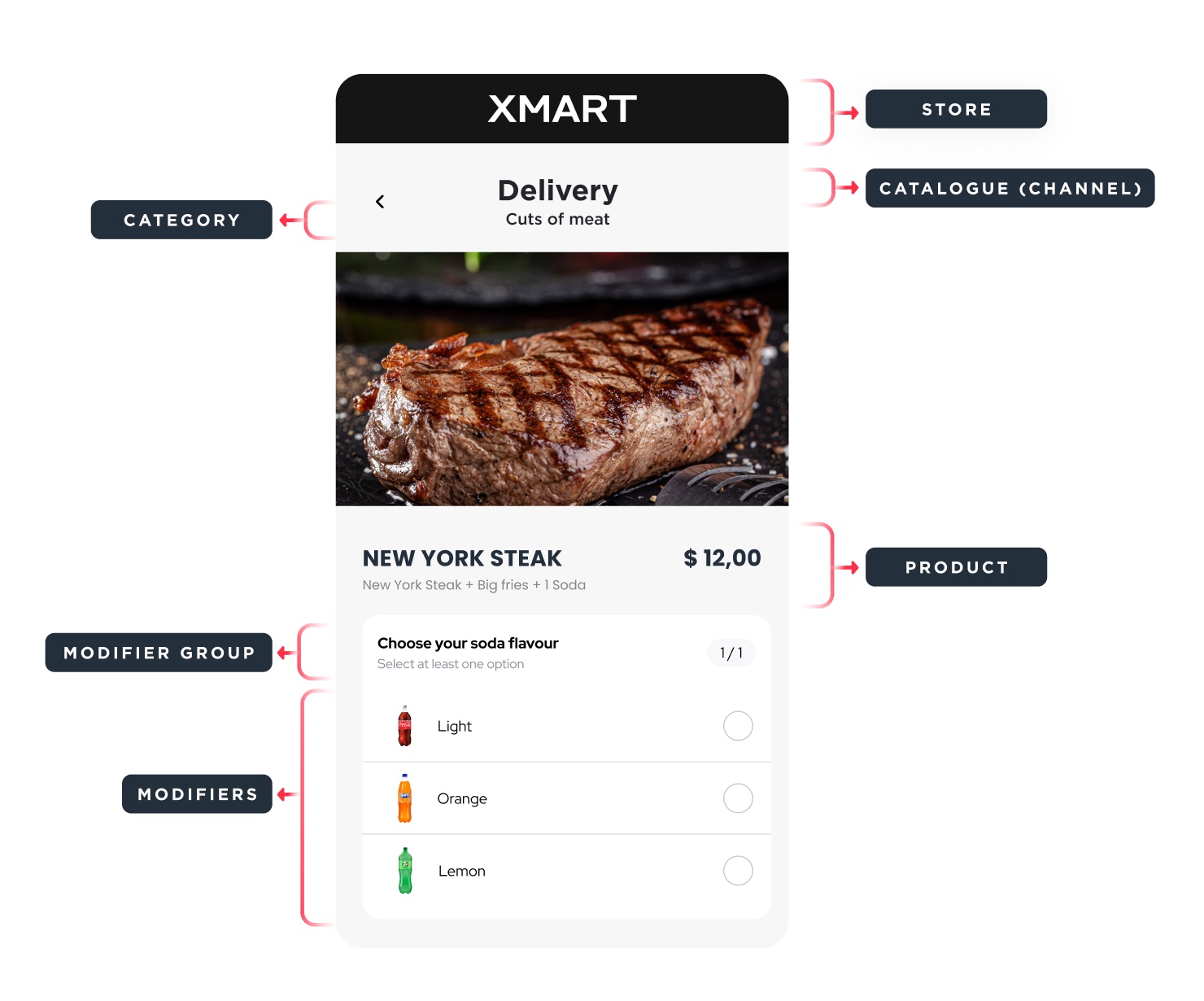
Create and update menus using the endpoints of the **V3 Lists API**. Each store can have its own individually configurable menu.
**Product**
Displayed as any item a user can select from a store's menu, including desserts, drinks, and condiments.
**Category**
Groups one or more products, such as Add-ons, Main Dishes, and Drinks.
**Modifier Groups**
Groups modifiers that can be selected as customizations under a main item. For example, the modifier group "Drink Flavor" contains eligible items like strawberry, lemon, and orange as options.
**Catalogue (Channel)**
Groups one or more categories from a store. It allows referencing two types of fulfillment: Pickup and Delivery.
# Components
* **Get Synchronization Report (GET)**
This endpoint provides a detailed report of the data synchronization, allowing you to monitor and verify the status of the synchronizations performed.
* **Register or Edit a List (PUT)**
This endpoint is used to add new stores and sales channels to the system. It facilitates the efficient expansion and updating of the store network.
# FAQ
**¿What specifications must menu item images meet for successful processing?**
Images must be sized 744px x 744px.
**¿Can I set specific availability schedules for categories, items, or modifiers?**
Yes, it is possible to set availability schedules for both **categories** and **items**. You must use the attribute *“schedules”:\[ ]* for both cases. In the case of **modifiers**, it is not possible to assign a schedule.
```bash Example for category theme={null}
{
"categories": [
{
"name": "DINNER",
"images": [
{
"fileUrl": "https://samercadito.blob.core.windows.net/imagenesv3/C761AD4F-FDA8-EF11-9C36-E18191D08780_744x744.png",
"imageCategoryId": "category"
}
],
"position": 480,
"schedules": [
{
"day": "FRIDAY",
"endTime": "16:00",
"startTime": "12:00"
},
{
"day": "MONDAY",
"endTime": "16:00",
"startTime": "12:00"
}
],
"displayInList": true,
"productListing": [
{
"position": 0,
"productId": 63897
}
],
"productCategoryId": "C761AD4F-FDA8-EF11-9C36-E18191D08780"
}
]
}
```
```bash Example for item theme={null}
{
"name": "ORANGE JUICE",
"type": "PRODUCT",
"active": true,
"images": [
{
"fileUrl": "https://samercadito.blob.core.windows.net/imagenesv3/domicilio_533_744x745_1721068779.png",
"imageCategoryId": "product"
}
],
"priceInfo": {
"price": 4.65,
"pointPrice": 200
},
"productId": 533,
"schedules": [
{
"day": "FRIDAY",
"endTime": "23:59",
"startTime": "05:00"
},
{
"day": "MONDAY",
"endTime": "23:59",
"startTime": "05:00"
}
],
"upselling": [
"62840",
"62865"
],
"description": "Orange juice",
"productModifiers": [
{
"position": 1,
"modifierId": "43152BBA-EE67-EB11-80F4-000D3A019254"
}
]
}
```
# Next Steps
See the [Order Integration Guide](/essentials/Order%20integration%20Guide) for steps to construct your menu.